Exercise Workbook for Advanced AutoCAD 2007
After completing this lesson, you will be able to:
Understand 3D Operations.
Mirror 3D, 3D Rotate, 3D Align and 3D Array
3D Operations allow you to 3D Mirror, 3D Rotate, 3D Align and 3D Array a solid. The methods are almost identical to the 2D commands with the exception of defining the plane. You do not have to move the UCS.
Note: You may use the equivalent 2D commands but they will only work in the XY plane. It may be necessary to move the UCS .
THE FOLLOWING ARE EXPLANATIONS FOR THE 3D COMMANDS .
You must define the mirror plane.
Select the 3D MIRROR command using one of the following:
TYPE = 3DMIRROR
PULLDOWN = MODIFY / 3D OPERATIONS / 3D MIRROR
TOOLBAR = NONE
Select objects: select the solid to be mirrored
Select objects:
Specify first point of mirror plane (3 points) or [Object/Last/Zaxis/View/XY/YZ/ZX/3points] <3points>:
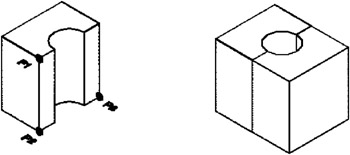
Specify first point on mirror plane: select first point on mirror plane (P1)
Specify second point on mirror plane: select second point on mirror plane (P2)
Specify third point on mirror plane: select third point on mirror plane (P3)
Delete source objects? [Yes/No]
EXAMPLE:

You must pick 2 points to define the axis of rotation and the...