SOLID EDITING
AutoCAD has many editing commands that allow you to edit existing solids. In this Lesson four of the more frequently used editing commands will be discussed. They are: Extrude faces, Move faces, Offset faces and Delete faces.
Before you can learn how to use these editing commands, you must first understand how to select the surfaces and how to add or subtract material.
Selecting a face to edit.
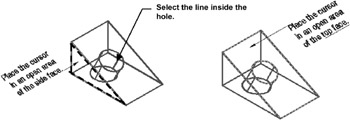
It is easiest to select the correct face or hole if the model is displayed in 2D wireframe. To select a face, place your cursor on an open area of the face (surface). Do not select an edge. (Consider turning off Osnap. It may prevent you from placing the cursor in the correct location)
To select a hole, place the cursor on the height line, inside the hole. If you select too many, hold the shift key down while clicking on the faces you did not want.
Positive vs. Negative value
Positive value adds material. Negative value subtracts material.
This sounds basic but you need to think about this. For example, if you need to increase the size of a hole you will enter a negative value because when the hole increases in size material is subtracted from...

 TABLE OF CONTENTS