Exercise Workbook for Advanced AutoCAD 2007
EXERCISE 8A: ASSIGNING ATTRIBUTES TO A BLOCK

EXERCISE 8A: ASSIGNING ATTRIBUTES TO A BLOCK

The following exercise will instruct you to draw a Box, Assign Attributes, create a block of the Box including attributes, then insert the new block and answer the prompts when they appear on the screen.

  1. Open My Decimal Setup and select the 11 X 17 (1 to 1) tab.

  2. Draw the Box shown on the next page.

    L = 3.75 W = 2.25 H = 3.00

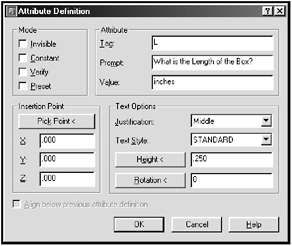
  3. Assign Attributes for Length

    1. Tag = L

    2. Prompt = What is the Length of the Box?

    3. Value = inches

    4. Justification = Middle

    5. Text Style = Standard

    6. Height = .250

    7. Rotation = 0

    8. Select OK and place as shown on 8-11.

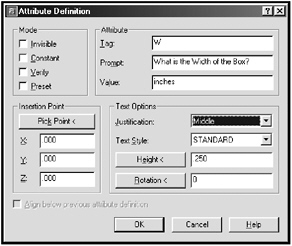
  4. Assign Attributes for Width

    1. Tag = W

    2. Prompt = What is the Width of the Box?

    3. Value = inches

    4. Justification = Middle

    5. Text Style = Standard

    6. Height = .250

    7. Rotation = 0

    8. Select OK and place as shown on 8-11.

  5. Assign Attributes for Height.

    1. Tag = H

    2. Prompt = What is Height of the Box?

    3. Value = inches

    4. Justification = Middle

    5. Text Style = Standard

    6. Height = .250

    7. Rotation = 0

UNLIMITED FREE
ACCESS
TO THE WORLD'S BEST IDEAS

SUBMIT
Already a GlobalSpec user? Log in.

This is embarrasing...

An error occurred while processing the form. Please try again in a few minutes.

Customize Your GlobalSpec Experience

Category: Bias Tees
Finish!
Privacy Policy

This is embarrasing...

An error occurred while processing the form. Please try again in a few minutes.