Exercise Workbook for Advanced AutoCAD 2007
What are Dynamic Blocks?
Dynamic Blocks are blocks that can be dynamically modified to represent different variations of the block.
An example could be a window or a screw. You will probably have many different sizes of windows in a floor plan or length of screws in an assembly. If you created a block for every variation you would have a long list of symbols.
Dynamic blocks allow you to create only one block but then define different lengths, size, rotation etc.
What makes a Block Dynamic?
Blocks are made dynamic by adding Parameters and Actions. The Block Editor is used to add these features. Once these features are added, the block can be changed easily after inserting. You will modify the blocks appearance using the custom grips or properties.
Previous to the Block Editor, blocks with many variations, built in, had to be created using AutoCAD s programming code AutoLisp. Those of us that are not programming types found this a bit difficult and would prefer to create all of the variations by drawing them and adding them to the symbol library. But now AutoCAD has made it possible for non-programming types to create Dynamic Blocks. Although I have to admit that it is not a piece of cake. It takes some studying to master this feature.
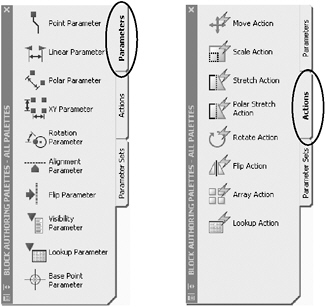
The following is the Block Authoring Palettes: Parameters and Actions.

Let s try creating a very...