Exercise Workbook for Advanced AutoCAD 2007
Lesson 12

LEARNING OBJECTIVES

After completing this lesson, you will be able to:

  1. Dimension using Datum dimensioning.

  2. Use alternate dimensioning for inches and Millimeters.

  3. Assign Tolerances to a part.

  4. Use Geometric tolerances.

  5. Typing Geometric Symbols.

ORDINATE DIMENSIONING

Ordinate dimensioning is primarily used by the sheet metal industry. But many others are realizing the speed and tidiness this dimensioning process allows.

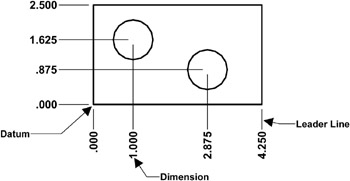
Ordinate dimensioning is used when the X and the Y coordinates, from one location, are the only dimensions necessary. Usually the part has a uniform thickness, such as a flat plate with holes drilled into it. The dimensions to each feature, such as a hole, originate from one datum location. This is similar to baseline dimensioning. Ordinate dimensions have only one datum. The datum location is usually the lower left corner of the object.

Ordinate dimensions appearance is also different. Each dimension has only one leader line and a numerical value. Ordinate dimensions do not have extension lines or arrows.

Example of Ordinate dimensioning:

Note:

Ordinate dimensions can be Associative and are Trans-spatial. Which means that you can dimension in paperspace and the ordinate dimensions will remain associated to the object they dimension. (Except for Qdim ordinate)

Refer to the next page for step by step instructions to create Ordinate dimensions .

CREATING ORDINATE DIMENSIONS

  1. Move the Origin to the desired datum location as follows:

    Note: This must be done in Model Space.

    1. Select TOOLS /...

UNLIMITED FREE
ACCESS
TO THE WORLD'S BEST IDEAS

SUBMIT
Already a GlobalSpec user? Log in.

This is embarrasing...

An error occurred while processing the form. Please try again in a few minutes.

Customize Your GlobalSpec Experience

Category: Angular Contact Bearings
Finish!
Privacy Policy

This is embarrasing...

An error occurred while processing the form. Please try again in a few minutes.