Exercise Workbook for Advanced AutoCAD 2007
The following exercise will help you learn how to assign multiple attributes to 3 different objects. This drawing will be used in lesson 9 to extract the information and place it in a spreadsheet such as Excel.
Open EX-5D (or EX-5E if you have AutoCAD LT)
Assign the attributes to the Sofa in the lobby, the Chair behind the office desk and one File Cabinet in the office.

NOTE: The Attribute details for each object are on the next pages.
Before you start, check the ATTDIA setting. (Refer to 8-8 )
LET S START WITH THE SOFA
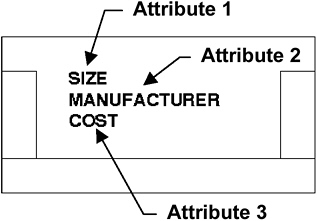
This is what the sofa should look like after you have completed the Attribute definitions shown below.
STEP 1
Select Draw / Block / Define Attributes
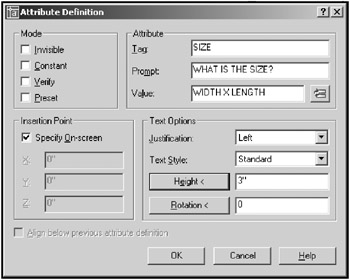
Fill in the boxes for Attribute 1.
Select the OK button and place the Tag (Size) approximately as shown.
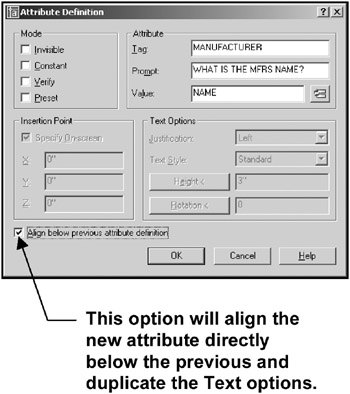
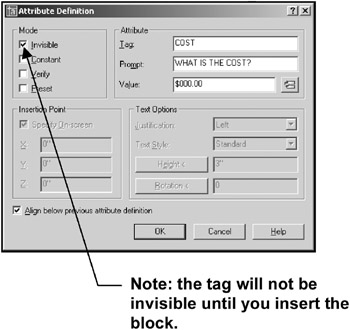
Repeat steps 1, 2 and 3 for Attributes 2 and 3.

ATTRIBUTE 1

ATTRIBUTE 2

ATTRIBUTE 3

STEP 2
Now create a block.
Select Draw / Block / Make
Name = Sofa
Select objects = select the sofa and the attribute text.
Pick Point = Any corner of the sofa.
NOW DO THE CHAIR
This is what the chair should look like after you have completed the Attribute definitions...