Adobe Photoshop Elements 4.0 A to Z: Tools and Features Illustrated Ready Reference
Canvas

Menu: -

Shortcut: -

OS: Mac, Windows

Version: 1, 2, 3, 4

See also: Canvas Size

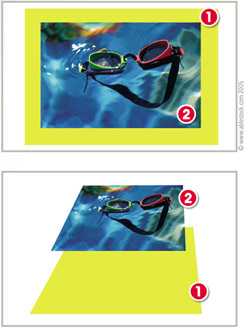
In creating documents in Photoshop Elements the program makes a distinction between the canvas (1), upon which pictures and other content is placed, and the image content (2) itself.

This is true even for photos with one layer only. For most newly imported photos the canvas and image size are exactly the same and so the canvas remains hidden from view.

Given this distinction, it is possible to resize, alter the format or change the color of the canvas without affecting the image at all.

UNLIMITED FREE
ACCESS
TO THE WORLD'S BEST IDEAS

SUBMIT
Already a GlobalSpec user? Log in.

This is embarrasing...

An error occurred while processing the form. Please try again in a few minutes.

Customize Your GlobalSpec Experience

Category: Awnings and Canopies
Finish!
Privacy Policy

This is embarrasing...

An error occurred while processing the form. Please try again in a few minutes.