Adobe Photoshop Elements 4.0 A to Z: Tools and Features Illustrated Ready Reference
Menu: Editor. Filter > Distort > Ocean Ripple
Shortcut:-
OS: Mac, Windows
Version: 1, 2, 3, 4
See also: Filters

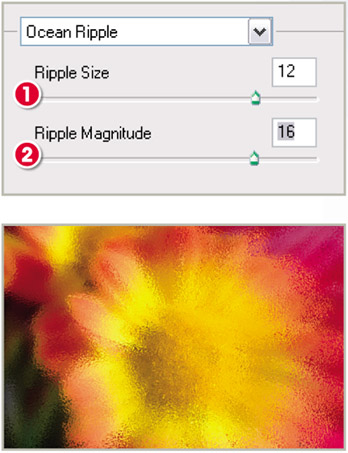
The Ocean Ripple filter, as one of the Distort group of filters, applies a rippled distortion to the whole of the picture surface. In this way it can create similar looking results to those obtained with the Glass or Ripple filters.
The filter contains two sliders controls.
The Ripple Size setting (1) adjusts the scale of the wave-like ripples that are added to the picture. Low values create smaller, less dramatic ripples.
The Ripple Magnitude slider (2) determines how far each ripple is distorted. High settings create a greater level of distortion in the final result.
Menu: Photo Browser: File > Get Photos > From Files and Folders
Shortcut:-
OS: Mac, Wlndows
Version: 3, 4
See also: Get Photos

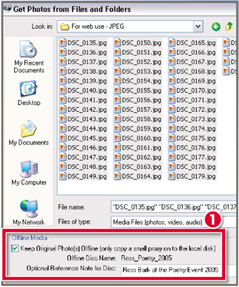
Most Elements users create their catalogs (the thumbnail collections that you see in the Photo Browser workspace) from folders of images stored on their hard drives or directly from their camera downloads, but did you know that the program can also generate catalogs from pictures that you have stored on CD or DVD disks?
When you File > Get Photos from your disk you have an option at the bottom of the dialogue (1) that allows you to keep the original pictures 'Offline' (on the CD or DVD) but load proxy versions of the photos into Elements to use...