Adobe Photoshop Elements 4.0 A to Z: Tools and Features Illustrated Ready Reference
Chalk & Charcoal Filter

Menu: Editor: Filter > Sketch > Chalk & Charcoal filter

Shortcut: -

OS: Mac, Windows

Version: 1, 2, 3, 4

See also: Charcoal filter

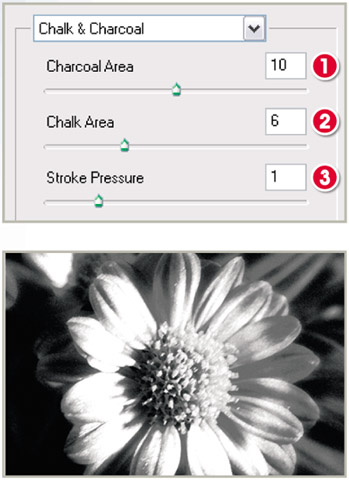
The Chalk & Charcoal filter is one of several drawing-like filters that can be found in the Sketch section of the Filter menu in Photoshop Elements. The feature simulates the effect of making a drawing of the photograph with white chalk and black charcoal. The tones in the photograph that range from shadow to mid gray are replaced by the charcoal strokes and those lighter values (from mid gray to white) are 'drawn' in using the chalk color.

The filter dialog gives you control over the balance of the amount and placement of the charcoal and chalk areas as well as the pressure of the stroke used to draw the picture. Higher values for the Charcoal (1) and Chalk (2) area sliders will increase the number and variations of tones that are drawn with these colors. High settings for the Stroke Pressure slider (3) produce crisper transitions between tones and a more contrasty result.

Pro's Tip

To add a little more color to your Chalk and Charcoal 'drawings' select colors other than black and white for the foreground and background values. Click each swatch to open the color picker where you can select the new hue.

UNLIMITED FREE
ACCESS
TO THE WORLD'S BEST IDEAS

SUBMIT
Already a GlobalSpec user? Log in.

This is embarrasing...

An error occurred while processing the form. Please try again in a few minutes.

Customize Your GlobalSpec Experience

Category: Color Meters and Appearance Instruments
Finish!
Privacy Policy

This is embarrasing...

An error occurred while processing the form. Please try again in a few minutes.