Adobe Photoshop Elements 4.0 A to Z: Tools and Features Illustrated Ready Reference
Captions

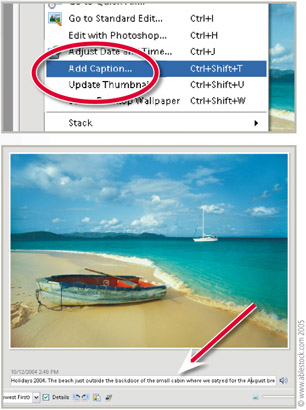
Menu: Photo Browser: Edit > Add Caption

Shortcut: Ctrl Shft T

OS: Windows

Version: 3, 4

See also: Tags, Keywords

Captions are another way to 'title' your photos beyond the standard file name. In Photoshop Elements 4.0 and 3.0 for Windows they can be added and used in a range of different ways.

Adding a Caption Captions can be added in the Single Photo View of the Photo Browser, the Properties Pane, via the Add Caption command or in the Caption field in the Date View.

Using a Caption Captions can be used, printed or displayed, in photo creations, web photo galleries as well as on contact sheets.

Pro's Tip

Captions need to be added to photos before this text can be used as part of the layout in creations.

UNLIMITED FREE
ACCESS
TO THE WORLD'S BEST IDEAS

SUBMIT
Already a GlobalSpec user? Log in.

This is embarrasing...

An error occurred while processing the form. Please try again in a few minutes.

Customize Your GlobalSpec Experience

Category: Digital Asset Management Software
Finish!
Privacy Policy

This is embarrasing...

An error occurred while processing the form. Please try again in a few minutes.