Adobe Photoshop Elements 4.0 A to Z: Tools and Features Illustrated Ready Reference

Catalog

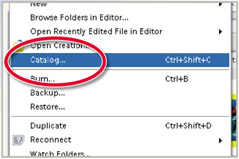
Menu: Photo Browser: File > Catalog

Shortcut: Ctrl Shft C

OS: Windows

Version: 3

See also: Photo Browser

When you import pictures (and other media flies) into the Photo Browser of Photoshop Elements 4.0 and 3.0 for Windows the program creates a database of the images and their details. As well as storing thumbnails of the original photographs (for displaying in the browser) the database also holds information such as where the photo is located, what format it is in, the date the picture was taken and what tags or keywords are attached to it.

The database that Elements creates is called a Catalog and is used by the program to track and help organize your flies. A new catalog is automatically created when you first install Photoshop Elements. Any pictures added to the program from that time forward are organized in this default catalog.

New catalogs can be created from either the Photo Browser or Date View workspaces by selecting File > Catalog, clicking the New option, choosing a location for the file and then adding a new catalog name.

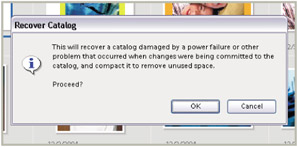
This dialog also contains the option to repair or recover a damaged catalog. Select this feature when catalog information is lost or damaged due to power failure during a cataloging operation.

UNLIMITED FREE
ACCESS
TO THE WORLD'S BEST IDEAS

SUBMIT
Already a GlobalSpec user? Log in.

This is embarrasing...

An error occurred while processing the form. Please try again in a few minutes.

Customize Your GlobalSpec Experience

Category: Digital Asset Management Software
Finish!
Privacy Policy

This is embarrasing...

An error occurred while processing the form. Please try again in a few minutes.