Adobe Photoshop Elements 4.0 A to Z: Tools and Features Illustrated Ready Reference
Menu: Editor: Filter > Pixelate > Facet
Shortcut: -
OS: Mac, Windows
Version: 1, 2, 3, 4
See also: Filters

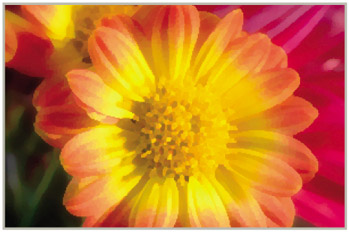
The Facet filter, as one of the group of Pixelate filters, simulates the look of a hand-worked painting by recreating the photo with blocks of color.
The filter contains no controls to alter the strength or appearance of the effect. Some changes in end results are possible by altering the image size before applying the filter. The filtering process produces more dramatic results when applied to low resolution flies than when used with pictures with large pixel dimensions.
As the filter doesn't have an Image Preview option it may be necessary to filter the picture several times with different resolution settings before deciding on the best values to use. Use Edit > Undo to reverse the last filter change.
Menu: -
Shortcut:-
OS: Mac, Windows
Version: 1, 2, 3, 4
See also: Font

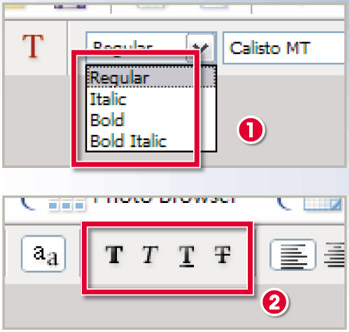
Some font families include several different versions of the typeface that you can use in conjunction with the Type tool. Typically, the Typeface options or styles include Bold, Italic and Bold Italic as well as the standard Regular faces (1). Each of the font faces shares the same basic letter design but a different alphabet is installed for each Face option (i.e. a different set of letters for Bold, Italic and Bold Italic options).
For fonts that don't have these Face or Style options Photoshop Elements has several 'faux' font choices...