Adobe Photoshop Elements 4.0 A to Z: Tools and Features Illustrated Ready Reference

Menu: -
Shortcut: -
OS: Mac, Windows
Version: 1, 2, 3, 4
See also: Blend modes

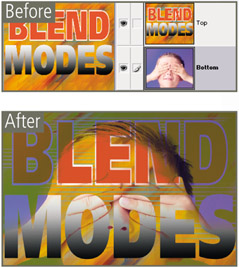
The Darken blending mode is one of the group of modes that darken the picture.
When the top layer is changed to the Darken mode both layers are examined at each part of the picture. When the darkest color is located it can be from either layer it is selected as the final color. Next the pixels in the top layer are compared to the final color; if they are lighter then they are replaced, if darker they are left unchanged.
Menu: -
Shortcut: -
OS: Windows
Version: 4
See also: Date View

In version 3.0 users could change the date associated with the photo by simply clicking on the Date entry that sat beneath the thumbnail in the Photo Browser workspace.
Some photographers found that the convenience of this one-click date change workflow meant that they were inadvertently changing photo dates even when they didn't mean to. So in version 4.0 of the program Adobe changed the process by which you change photo dates.
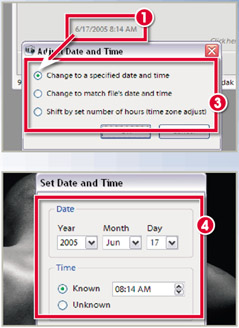
Now, by default, clicking on the date entry that sits beneath thumbnail (1) won't display a Date Change dialog. This option has to be turned on in the Photo Browser preferences. Navigate to Edit > Preferences > General and select the Adjust Date and Time by Clicking on Thumbnail Dates option (2).
After changing this setting, clicking on...