Photoshop CS A to Z: The Essential Visual Reference Guide

Designed to present the program in a visual way and in a logical order, this helpful, concise guide presents handy tips and useful quick keys that make Photoshop CS work for you.
 TABLE OF CONTENTS
 | QUICK KEY | X ALTERNATES BETWEEN BACKGROUND AND FOREGROUND COLOR |
The default is white which appears in the lower box of the tools palette. You can change the color from white by clicking on this box and using the color picker to select a new one. One reason for doing this is when making gradient fills which progress from the foreground to background color. Erasing part of an image leaves the background color.
(See Foreground color )

| Tip |
|
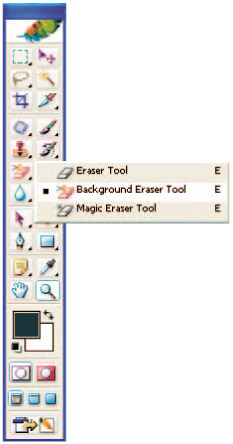
A feature that first appeared on version 5. 5 that makes it much easier to make selections. Now you paint over the area you want to remove using the Background Eraser tool and the tool makes the area transparent. Then when you copy and paste to a new layer it will look more natural.
Discontinguous erases the sample color wherever it appears in the picture; Contiguous erases pixels that are connected and Find Edges preserves edge sharpness.


| Tip |
|
| MENU | FILE ? |
| AUTOMATE ? | |
| BATCH |
If you've ever had to deal with a pile of images that all needed converting from one format or color mode to another you'll welcome this feature. Batch processing takes a selection of images from a...