Photoshop CS A to Z: The Essential Visual Reference Guide
Designed to present the program in a visual way and in a logical order, this helpful, concise guide presents handy tips and useful quick keys that make Photoshop CS work for you.
 TABLE OF CONTENTS
 | MENU | IMAGE ? |
| CALCULATIONS |
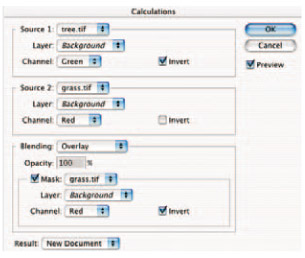
This mode lets you merge two channels from one or two images and save the result as a new channel in one of the existing images or create a new image. The Calculations palette gives you various options including Blend method and is useful if you want to combine masks or selections.
The phrase 'what you see is what you get', or 'wysiwyg' (pronounced whizzywig) couldn't be more important. When you view an image on the computer screen you want it to appear exactly the same when it prints out - oh if life were so simple! Computer monitors can be wildly out - just like your neighbour's television, and a high contrast, vivid color image on screen is likely to be disappointingly dull when printed.
It's because the image on the monitor is an RGB file that's projected light, while the printed image is a CMYK version that you view by reflected light. To get round this you need to calibrate your system.
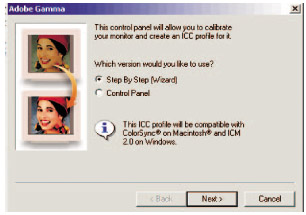
Adobe Gamma can be found in the Control Panel from the Start menu of a Windows PC.
Adjust your monitor using Adobe's Gamma file which should be located in your Window's Control Panel. Mac users can use the Apple utility that is in the control panel, or System Preferences on OSX. These easy-to-follow wizards help you adjust brightness, contrast and gamma to ensure life-like prints.
You also need scanner and printer profiles set up to ensure that...