Photoshop CS A to Z: The Essential Visual Reference Guide

Designed to present the program in a visual way and in a logical order, this helpful, concise guide presents handy tips and useful quick keys that make Photoshop CS work for you.
 TABLE OF CONTENTS
 Short for Joint Photographic Experts Group. The most popular method of image compression that's great for continuous tone photographs.
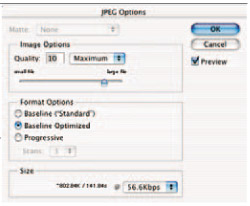
It supports CMYK, RGB and grayscale. It's a lossy compression method so information is discarded to save disk space, but when saved at a minimal compression level the image can be indistinguishable from the original.
The JPEG Options palette has a slider to adjust the compression level from 0 low quality/high compression to 10 high quality/low compression. Set 10+ for best printed results and around 6 for Web use, avoid lower settings where possible.
You also have three format options - Baseline Standard for normal use, Baseline Optimized, a higher compression method used for saving images for Web use, and Progressive, also for Web use. This option displays the image in stages so the viewer can skip by if the photo isn't interesting.
| Warning |
|
A traditional photo technique is to take a series of pictures from the same position, each with a different viewpoint. Then the photographer mounts the images side by side to create a 'joiner', or panorama or a more random built up picture (below).
This can be done manually in Photoshop using gradient masks and the Clone stamp, but it's easier...








