Exercise Workbook for Beginning AutoCAD 2005

Use this easy-to-follow, self-study guide to learn the basics of AutoCAD through step-by-step lessons and non-intimidating exercises.
 TABLE OF CONTENTS
 The first item on the learning agenda is how to create a template file from the " Workbook Helper.dwg". If a CD did not accompany this workbook, go to the website http://www.industrialpress.com to download the files for workbook 2005 and save them to a disk.
Now we will create a template. This will be a very easy task.
Start AutoCAD as follows:
Start button / Programs / Autodesk / AutoCAD 2005 or LT / AutoCAD 2005 or LT
| Note | If a dialog box appears select the "Cancel" button. |
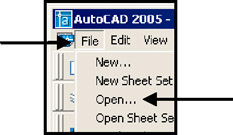
Select File / Open
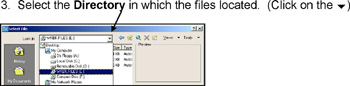
Select the Directory in which the files located. (Click on the  )
)
Select the file " Workbook Helper.dwg" and then " Open" button.
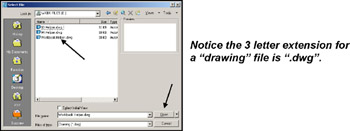
Notice the 3 letter extension for a "drawing" file is ".dwg".
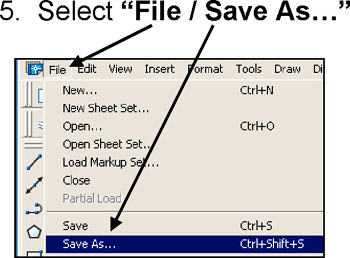
Select "File / Save As "
Select the " Files of type:" down arrow  to display different saving formats. Select "AutoCAD Drawing Template (*.dwt)".

Notice the 3 letter extension for Template is ".dwt".
A list of all the AutoCAD templates will appear. (Note: Your list may be different)
Type the new name " 1Workbook Helper" in the " File name:" box and then select the " Save" button.
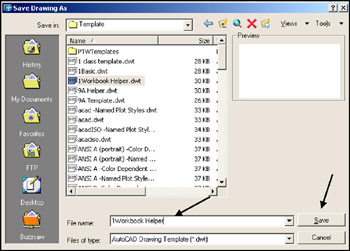
| Note | The "1" before the name will place the file at the top of the list. AutoCAD displays numerical first and then alphabetical. |
Notice it was not necessary to type the extension .dwt because "Files of type" was previously selected.
Type a...