Exercise Workbook for Beginning AutoCAD 2005

Use this easy-to-follow, self-study guide to learn the basics of AutoCAD through step-by-step lessons and non-intimidating exercises.
 TABLE OF CONTENTS
 When you create a new layer you will assign a name, color, linetype, lineweight and whether it should plot or not.
Using layers is an important part of managing your drawing. It is better to have too many layers than too few.
Select the Layer command using one of the following:
TYPE = LA
PULLDOWN = FORMAT / LAYER
TOOLBAR = OBJECT PROPERTIES 
The Layer Properties Manager dialog box shown below will appear.
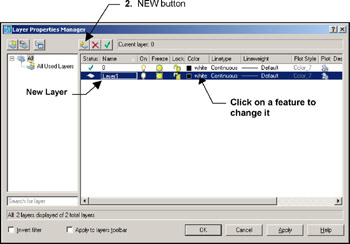
Select the New Layer button and a new layer will appear.
Click on any of the features and a dialog box will appear.
Make your selections and then select OK. The changes will appear immediately.
If the desired linetype is not listed, refer to "Loading Linetypes" on the next page.