Exercise Workbook for Beginning AutoCAD 2005

Use this easy-to-follow, self-study guide to learn the basics of AutoCAD through step-by-step lessons and non-intimidating exercises.
 TABLE OF CONTENTS
 Sorry LT users, this command is not available to you. Skip to Lesson 21.
Quick Dimension creates multiple dimensions with one command. Quick Dimension can create Continuous, Staggered, Baseline, Ordinate, Radius and Diameter dimensions. ("Ordinate" will be discussed in the Advanced workbook)
Select the Quick Dimension command using one of the following:
TYPE = QDIM
PULLDOWN = Dimension/Quick Dimension
TOOLBAR = DIMENSION 
Command: _qdim Select geometry to dimension: Specify opposite corner:
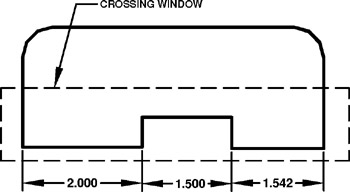
CONTINUOUS
Select the objects to be dimensioned with a crossing window or pick each object
Press
Specify dimension line position, or [Continuous/Staggered/Baseline/Ordinate/Radius/Diameter/datumPoint/Edit/settings]
Select the location of the dimension line.
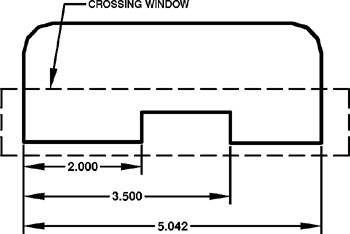
BASELINE
Select the objects to be dimensioned with a crossing window or pick each object.
Press
Specify dimension line position, or [Continuous/Staggered/Baseline/Ordinate/Radius/Diameter/datumPoint/Edit/settings]
Select the location of the dimension line.
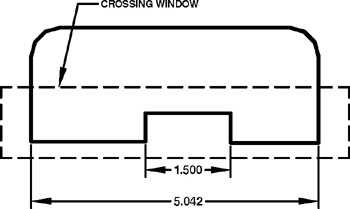
STAGGERED
Select the objects to be dimensioned with a crossing window or pick each object.
Press
Specify dimension line position, or [Continuous/Staggered/Baseline/Ordinate/Radius/Diameter/datumPoint/Edit/settings]
Select the location of the dimension line.
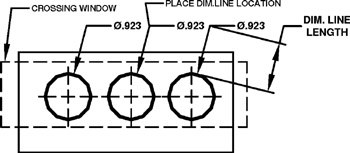
DIAMETER
Select the objects to be dimensioned with a crossing window or pick each object (Qdim will automatically filter out any linear dims)
Press
Specify dimension line position, or [Continuous/Staggered/Baseline/Ordinate/Radius/Diameter/datumPoint/Edit/settings]
Select the location of the dimension line.
(Dimension line length is determined by the "Baseline Spacing" setting)
RADIUS
Select...