Exercise Workbook for Beginning AutoCAD 2005

Use this easy-to-follow, self-study guide to learn the basics of AutoCAD through step-by-step lessons and non-intimidating exercises.
 TABLE OF CONTENTS
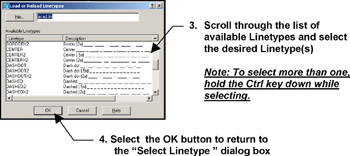
 In an effort to conserve data within a drawing file, AutoCAD automatically loads only one linetype called "continuous". If you would like to use other linetypes, such as "dashed", you must "Load" them into the drawing as follows.
Select the Layer command using one of the following:
TYPE = LA
PULLDOWN = FORMAT / LAYER
TOOLBAR = OBJECT PROPERTIES 
Click on the Linetype.
Select the "Load" button.
5. Select the OK button after you have completed #4 to return to the Layer Properties Manager dialog box.
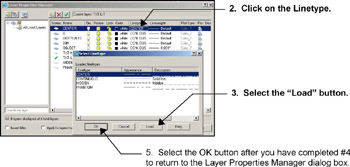
The Load or Reload Linetypes dialog box shown below will appear.