Exercise Workbook for Beginning AutoCAD 2005

Use this easy-to-follow, self-study guide to learn the basics of AutoCAD through step-by-step lessons and non-intimidating exercises.
 TABLE OF CONTENTS
 CREATE A MASTER DECIMAL SETUP DRAWING
The following instructions will guide you through creating a "Master" decimal setup drawing. The "1Workbook Helper" is an example of a Master setup drawing. Even though the screen appears blank, the actual file is full of settings, such as: Units, Drawing Limits, Snap and Grid settings, Layers, Text styles and Dimension Styles. Once you have created this "Master" drawing, you just open it and draw. No more repetitive inputting of settings.
NEW SETTINGS
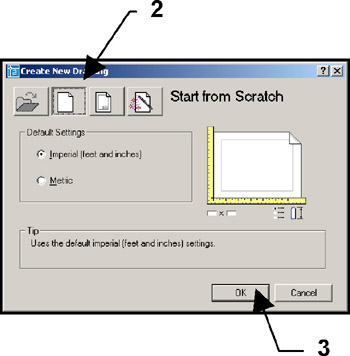
Begin your drawing without a template as follows:
Select "FILE / NEW".
Select "START FROM SCRATCH" Box.
Select " OK".
Your screen should be blank, no grids and the current layer is 0.
Set drawing specifications as follows:
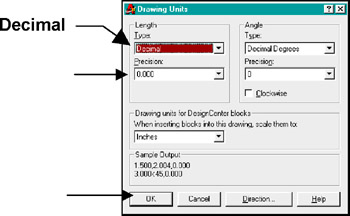
Set "UNITS" of measurement.
Use " FORMAT / UNITS and change the settings as shown.
Then select OK.
Set " DRAWING LIMITS" (size of drawing area). USE " FORMAT / DRAWING LIMITS
Lower left corner = 0.000,0.000
Upper right corner = 17, 11
Use "VIEW / ZOOM / ALL" to generate the new limits
Set your Grids to ON to display the paper size.
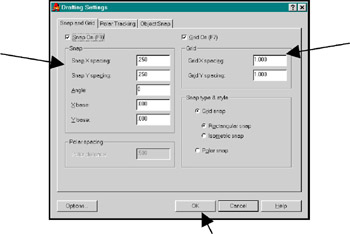
Set "SNAP AND GRID"
Use " TOOLS / DRAFTING SETTINGS.
Change the settings as shown below and then select OK.
Set "PICK BOX" size (your preference) See page 26-18 for instructions.
NEW LAYERS
Create new layers
First Load the linetypes listed below. (See page 26-4 for instructions)
CENTER2
HIDDEN
PHANTOM2
Assign names, colors, linetypes and plotability.