Exercise Workbook for Beginning AutoCAD 2005

Use this easy-to-follow, self-study guide to learn the basics of AutoCAD through step-by-step lessons and non-intimidating exercises.
 TABLE OF CONTENTS
 A polygon is an object with multiple sides of equal length. You may specify from 3 to 1024 sides. A polygon appears to be multiple lines, but, in fact, it is one object. You can specify the edge length or the center and a radius. The radius can be drawn inside (Inscribed) an imaginary circle or outside (Circumscribed) an imaginary circle.
CENTER / RADIUS METHOD
Select the Polygon command using one of the following:
TYPING = POL
PULLDOWN = DRAW / POLYGON
TOOLBAR = DRAW 
The following prompts will appear on the command line:
_polygon Enter number of sides <4>: type number of sides
Specify center of polygon or [Edge]: specify the center location
Enter an option [Inscribed in circle/Circumscribed about circle]: type I or C
Specify radius of circle: type radius or locate with cursor.

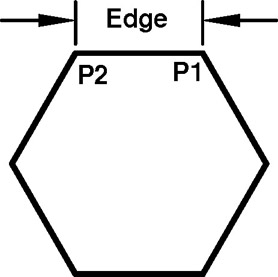
EDGE METHOD
Select the Polygon command using one of the following:
TYPING = POL
PULLDOWN = DRAW / POLYGON
TOOLBAR = DRAW 
The following prompts will appear on the command line:
_polygon Enter number of sides <4>: type number of sides
Specify center of polygon or [Edge]: type E
Specify first endpoint of edge: place first endpoint of edge (P1)
Specify second endpoint of edge: place second endpoint of edge (P2)
An Ellipse may be drawn by specifying the 3 points of the axes or by defining the center point and major / minor axis points.
AXIS END METHOD
Select the ELLIPSE command using one of the following: