Exercise Workbook for Beginning AutoCAD 2005

Use this easy-to-follow, self-study guide to learn the basics of AutoCAD through step-by-step lessons and non-intimidating exercises.
 TABLE OF CONTENTS
 A POLYLINE is very similar to a LINE. It is created in the same way a line is drawn. It requires first and second endpoints. But a POLYLINE has additional features, as follows:
A POLYLINE is ONE object, even though it may have many segments.
You may specify a specific width to each segment.
You may specify a different width to the start and end of a polyline segment.
THE FOLLOWING ARE EXAMPLES OF POLYLINES WITH WIDTHS ASSIGNED.
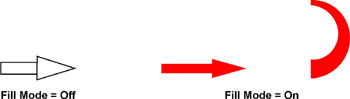
To turn FILL MODE on or off.
Command: type FILL
Enter mode [On / Off]
Command: type REGEN < enter> or select: View / Regen
| Note | If you explode a POLYLINE it loses its width and turns into a regular line. |
THE FOLLOWING IS AN EXAMPLE OF DRAWING A POLYLINE WITH "WIDTH"
Select the POLYLINE command using one of the following:
TYPE = PL
PULLDOWN = DRAW / POLYLINE
TOOLBAR = DRAW 
Command: _pline
Specify start point: place the first endpoint of the line Current line-width is 0.000
Specify next point or [Arc/Close/Halfwidth/Length/Undo/Width]: type w
Specify starting width <0.000>: type the desired width
Specify ending width <0.000>: type the desired width
Specify next point or [Arc/Close/Halfwidth/Length/Undo/Width]: place the next endpoint
Specify next point or [Arc/Close/Halfwidth/Length/Undo/Width]: place the next endpoint
Specify next point or [Arc/Close/Halfwidth/Length/Undo/Width]: place the next endpoint
Specify next point or [Arc/Close/Halfwidth/Length/Undo/Width]: type C
OPTIONS:
WIDTH
Specify the starting and ending width.

You can create a tapered polyline by specifying different...