Exercise Workbook for Beginning AutoCAD 2005

Use this easy-to-follow, self-study guide to learn the basics of AutoCAD through step-by-step lessons and non-intimidating exercises.
 TABLE OF CONTENTS
 When you select Dimension / Style / Modify the following dialog box will appear.
The following are descriptions for each setting within each section tab.
Lines and Arrows tab

Dimension Lines
Color: Color of the dimension line.
Lineweight: Sets the width of the dimension lines.
Extend beyond ticks: Distance to extend dimension line beyond the extension line. Example above.
Baseline spacing: Spacing between baseline dimensions.
Suppress: Suppress means disappear. You may suppress individually or both.
Extension Lines
Color: Color of the extension lines
Lineweight: Sets the width of the extension lines.
Extend beyond dim. line: Distance to extend extension line beyond the dimension line. Example above.
Offset from origin: The distance between the object and the extension line. Example above.
Supress: You may suppress individually or both.
Arrowheads
1 st : Sets the style for the symbol inserted for the first extension point
2 nd: Sets the style for the symbol inserted for the second extension point and for Diameter and Radius.
Leader: Sets the style for the symbol inserted for Leaders.
Arrow Size: Sets the Size of Arrowheads. Example above.
Center Marks for Circles
Type: Select None, Mark or Line Size: Specify Size. Example above.
TEXT tab
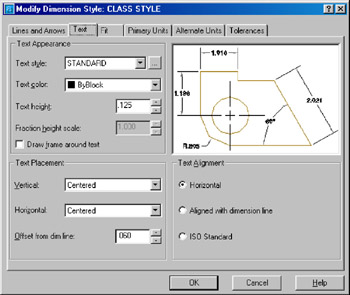
Text Appearance
Text Style: Select which text style to use for the dimension text. To create or change a style, select the [ ] button.