Exercise Workbook for Beginning AutoCAD 2005

Use this easy-to-follow, self-study guide to learn the basics of AutoCAD through step-by-step lessons and non-intimidating exercises.
 TABLE OF CONTENTS
 In the previous lessons you have been using the cursor to place objects. In this lesson you will learn how to place objects in specific locations by entering coordinates. This process is called Coordinate Input.
This is not difficult, so do not start to worry.
Autocad uses the Cartesian Coordinate System.
The Cartesian Coordinate System has 3 axes, X, Y and Z.
The X is the Horizontal axis. ( Right and Left)
The Y is the Vertical axis. ( Up and Down)
The Z is Perpendicular to the X and Y plane.
(The Z axis, which is not discussed in this workbook, is used for 3D.)
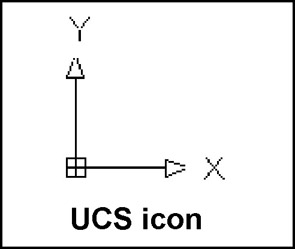
Look at the User Coordinate System (UCS) icon in the lower left corner of your screen. The arrows are pointing in the positive direction.
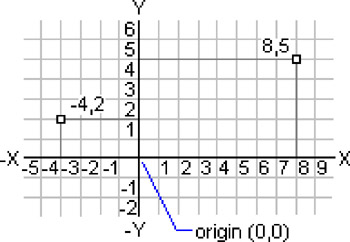
The location where the X, Y and Z axes intersect is called the ORIGIN. (0,0,0) Currently the Origin is located in the lower left corner of the screen.
When you move the cursor away from the Origin, in the direction of the arrows, the X and Y coordinates are positive.
When you move the cursor in the opposite direction, the X and Y coordinates are negative.
Using this system, every point on the screen can be specified using positive and negative X and Y coordinates.
There are 3 types of Coordinate input, Absolute, Relative and Polar. (Polar will be discussed in Lesson 11)
ABSOLUTE COORDINATES...