Exercise Workbook for Beginning AutoCAD 2005

Use this easy-to-follow, self-study guide to learn the basics of AutoCAD through step-by-step lessons and non-intimidating exercises.
 TABLE OF CONTENTS
 ? Pick box
When AutoCAD prompts you to select objects, such as when you are erasing objects, the cursor (crosshairs) turns into a square. This square is called a Pick box. The size of the Pick box can be changed. Some AutoCAD users prefer large boxes, some like small boxes. The size of the box is your personal preference, however, the smaller the Pick box the more accurate you must be when placing the pick box on an object to select it. If the Pick box is too large it could overlap onto other objects that you did not want to select.
HOW TO CHANGE THE "PICK BOX" SIZE.
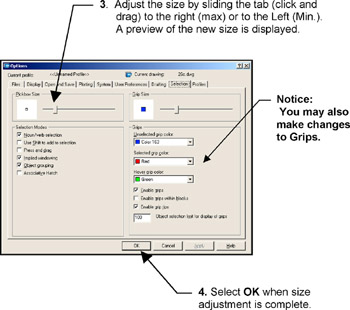
Select TOOLS / OPTIONS
Select the SELECTION tab.
Adjust the size by sliding the tab (click and drag) to the right (max) or to the Left (Min.). A preview of the new size is displayed.
Select OK when size adjustment is complete.
The following dialog box will appear.