Exercise Workbook for Beginning AutoCAD 2005

Use this easy-to-follow, self-study guide to learn the basics of AutoCAD through step-by-step lessons and non-intimidating exercises.
 TABLE OF CONTENTS
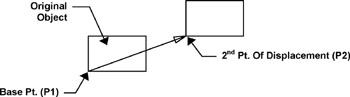
 The COPY command creates a duplicate set of the objects selected. The COPY command is similar to the MOVE command. You must select the objects to be copied, select a base point and a new location. The difference is, the Move command merely moves the objects to a new location. The Copy command makes a copy and you select the location for the new copy.
Select the Copy command using one of the following commands:
TYPE = CO
PULLDOWN = MODIFY / COPY
TOOLBAR = MODIFY 
Command: _copy
Select objects: select the objects you want to copy
Select objects: stop selecting objects by selecting
Specify base point or displacement: select a base point (P1) (usually on the object)
Specify second point of displacement or
The MIRROR command allows you to make a mirrored image of any objects you select. You can use this command for creating right / left hand parts. You can draw a symmetrical object more efficiently by only drawing half of it.
Select the MIRROR command using one of the following:
TYPE = MI
PULLDOWN = MODIFY / MIRROR
TOOLBARS = MODIFY 
The following will appear on the command line:
Command: _mirror
Select objects: select the objects to be mirrored
Select objects: stop selecting objects by selecting
Specify first point of mirror line: