Exercise Workbook for Beginning AutoCAD 2005

Use this easy-to-follow, self-study guide to learn the basics of AutoCAD through step-by-step lessons and non-intimidating exercises.
 TABLE OF CONTENTS
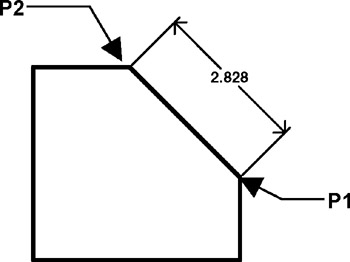
 The ALIGNED dimension command aligns the dimension with the angle of the object that you are dimensioning. The process is the same as Linear dimensioning. It requires two extension line origins and placement of text location. (Example below)
Select the ALIGNED command using one of the following:
TYPE = DIMALIGNED or DIMALI or DAL
PULLDOWN = DIMENSION / ALIGNED
TOOLBAR = DIMENSION 
Command: _dimaligned
Specify first extension line origin or
Specify second extension line origin: select the second extension line origin (P2)
Specify dimension line location or [Mtext/Text/Angle]: place dimension text location
Dimension text = the dimension value will appear here
The LEADER command is primarily used to add a note to an object. A Leader's appearance is very similar to a Radial dimension but a Leader should not to be used for Radial dimensioning. A Leader allows you to type a note at the end of the hook. (Note: Leader and Qleader are the same command)
If associative dimensioning is turned on with DIMASSOC, the leader start point can be associated with a location on an object. If the object is relocated, the arrowhead remains attached to the object and the leader line stretches, but the text or feature control frame remains in place.
Select the LEADER command using one of the following.
TYPE = LE or QLEADER
PULLDOWN = DIMENSION / LEADER
TOOLBAR = DIMENSION 

Command: _qleader
Specify first leader...