Digital Electronics and Design with VHDL

Objective: This tutorial, which is a complement to Chapter 25, concisely describes the use of PSpice A/D to perform circuit simulations. The version used in this tutorial is Cadence OrCAD PSpice A/D 15.7.
The tutorial is divided in two parts, depending on how the circuit to be tested is entered.
Part I: SPICE Simulation with Coded Input
In this case the circuit is entered using SPICE code (recommended).
Part II: SPICE Simulation with Graphical input
In this case circuit schematics are entered instead (this is old fashioned and difficult to modify or share).
In this case, the circuit is entered using a text file (that is, SPICE code).
The RC circuit of Example 25.5 (repeated in Figure B.1) will be employed as an example, of which the transient response will be examined.
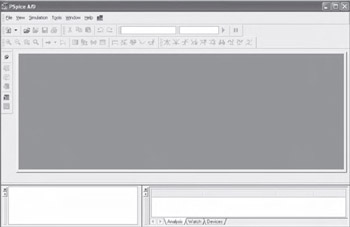
Start PSpice A/D. A screen similar to Figure B.2 will be shown.
Figure B.1
Figure B.2
Open a new text file by selecting File > New > Text File or click
.
Type (or paste) the SPICE code for the circuit of Figure B.1, with transient analysis specifications included, as follows, where V in consists of a square wave with 10 ms period and 50% duty cycle, and the total simulation time is 25 ms divided in steps of 10 ?s.
<span class="beginpage"> pagenum="668"><a name="2107"></a><a name="IDX-668"></a></span>*--------------------------------------* File "rc_circuit.cir"*--------------------------------------R1 1 2 1kR2 2 0 1kC1 2 0 1u*--------------------------------------Vin 1 0 PULSE (0V...