Exercise Workbook for Advanced AutoCAD 2005

Lesson 5

MULTILINE (Not available in LT, refer to page 5 8)

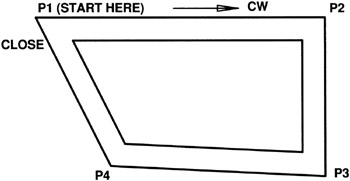
The MULTILINE command is a method for drawing a set of parallel lines. The set can have up to 16 parallel lines. These multilines can basically be drawn in the same manner as a line, with first and second endpoints. You can even use the CLOSE option. But the set is only one object, not multiple objects. The walls on a Floor plan would be an example of an Architectural application. The belts on a conveyor would be an example of a Mechanical application. Multiple circuit lines on a schematic would be an example of an Electrical application. Roads and Intersection would be an example of a Civil application.

Before using the MULTILINE command you must Create a MULTILINE STYLE . (Or you may merely want to use the AutoCAD default style named STANDARD.) Instructions for Creating a Multiline Style are on page 5 4.

First we will discuss how to draw with the MULTILINE command using the AutoCAD default Multiline Style Standard .

  1. Select the MULTILINE command using one of the following commands:

    TYPE=ML

    PULLDOWN=DRAW/MULTILINE

    TOOLBAR=DRAW

    Command: _mline

    Current settings: Justification=Top, Scale=1.00, Style=STANDARD

  2. Specify start point or [Justification/Scale/STyle]: select the start point (P1)

  3. Specify next point: select the next point (P2)

  4. Specify next point or [Undo]: select the next point (P3)

  5. Specify next point or [Close/Undo]: select the next point (P4)

  6. Specify next point or [Close/Undo]: Close

JUSTIFICATION

Because there are multiple lines, you must specify the justification of...

UNLIMITED FREE
ACCESS
TO THE WORLD'S BEST IDEAS

SUBMIT
Already a GlobalSpec user? Log in.

This is embarrasing...

An error occurred while processing the form. Please try again in a few minutes.

Customize Your GlobalSpec Experience

Category: Jet Pumps
Finish!
Privacy Policy

This is embarrasing...

An error occurred while processing the form. Please try again in a few minutes.