Exercise Workbook for Advanced AutoCAD 2005

When you are using a CAD system, you should make an effort to ONLY draw an object once. If you have to duplicate the object, use a command such as: Copy, Array, Mirror or Block. Remember, this will make drawing with CAD more efficient.
In the following exercise, you will create two mechanical symbols that you use frequently. You will create them once and then merely drag and drop them, from the DesignCenter, when needed. This will save you many hours in the future.
Save this library file as Library so it will be easy to find when using the DesignCenter or create a Library Palette.
Open My Decimal Setup
Select the 11 17 (1 to 1) tab.
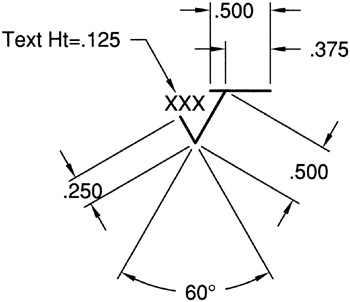
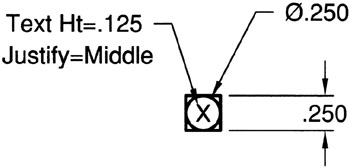
Draw each of the Symbol objects, shown on the next page, actual size. Do not scale.
Create an individual Block for each one using the BLOCK command.
Save this drawing as: Library
Plot a drawing of your library symbols for reference. The format is your choice.
Plot using Page Set up: 11 17 MONO.
| SYMBOL | INSTRUCTIONS |
|---|---|
| FINISH MARK | Layer=Symbol Assign Attributes to the Text |
| NOTE IDENTIFIER |