Exercise Workbook for Advanced AutoCAD 2005

You can t use the Copy command to copy objects from one drawing to another drawing. You must use EDIT/COPY and EDIT/PASTE.
AutoCAD allows you to select objects in a drawing (EDIT/COPY) and then copy those objects to another drawing (EDIT/PASTE). Or you may remove the objects from the original drawing (EDIT/CUT) and then copy (EDIT/PASTE) them to another drawing.
You can also copy, cut and paste between AutoCAD and other documents such as Microsoft Word, Excel or any other Windows application.
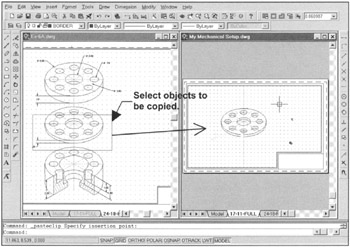
Open two AutoCAD drawings and Tile Vertically. (Example below)
Activate the drawing that contains the objects you want to copy. (Click in the drawing area)
Select the COPY or CUT command using one of the following:
| TYPE=Copyclip | TYPE=Cutclip | TYPE=Pasteclip |
| PULLDOWN=EDIT/COPY | PULLDOWN=EDIT/CUT | PULLDOWN=EDIT/PASTE |
| TOOLBAR=STANDARD | TOOLBAR=STANDARD | TOOLBAR=STANDARD |

Select the objects to copy then
Activate the drawing in which the objects will be pasted.
Select the PASTE command.
Place the objects with the cursor by dragging the objects to the correct location and click.
In the example above the base point for insertion was not requested. If you wish to designate a specific basepoint see COPY with a Base Point on the next page.
Copies of the objects are temporarily stored on the Windows...