Exercise Workbook for Advanced AutoCAD 2005

EXERCISES

EXERCISE 157-1

INSTRUCTIONS:

  1. Open MY DECIMAL SETUP

  2. Select the 24 18 (1 to 1) tab.

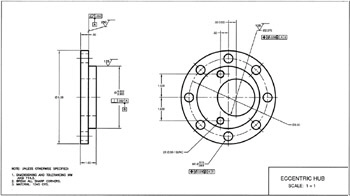
  3. Draw ECCENTRIC HUB above, in model space, full scale.

  4. Dimension as shown. Set the Tolerance Text Ht to .125.

  5. Insert the symbols, on the Symbols Layer, using DesignCenter.

  6. Fill in the information in the title block area

  7. Save as: EX-157 1 and Plot using Page Setup: 24 18 MONO.

EXERCISE 157-2

INSTRUCTIONS:

  1. Open MY DECIMAL SETUP

  2. Select the 24 18 (1 to 1) tab.

  3. Draw SPLINE HUB above, in model space, full scale. Use Hatch Pattern=ANSI 31

  4. Dimension as shown. Set the Tolerance Text Ht to .125.

  5. Insert the symbols, on the Symbols Layer, using DesignCenter.

  6. Fill in the information in the title block area

  7. Save as: EX-157 2 and Plot using Page Setup: 24 18 MONO.

EXERCISE 157-3

INSTRUCTIONS:

  1. Open MY DECIMAL SETUP

  2. Select the 24 18 (1 to 1) tab.

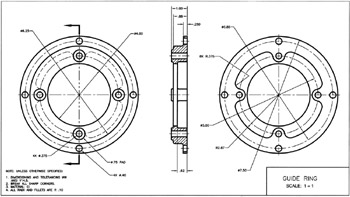
  3. Draw GUIDE RING above, in model space, full scale. Use POLYLINE for the Section Line, (width=.04)

  4. Dimension as shown.

  5. Hatch Pattern=ANSI 31.

  6. Fill in the information in the title block area

  7. Save as: EX-157 3 and Plot using Page Setup: 24 18 MONO.

UNLIMITED FREE
ACCESS
TO THE WORLD'S BEST IDEAS

SUBMIT
Already a GlobalSpec user? Log in.

This is embarrasing...

An error occurred while processing the form. Please try again in a few minutes.

Customize Your GlobalSpec Experience

Category: Tank Monitoring Systems
Finish!
Privacy Policy

This is embarrasing...

An error occurred while processing the form. Please try again in a few minutes.