Exercise Workbook for Advanced AutoCAD 2005

When you are using a CAD system, you should make an effort to only draw an object once. If you need to duplicate the object, use a command such as: Copy, Array, Mirror or Block. This will make drawing with CAD more efficient.
In the following exercise, you will create a file full of architectural symbols that you will use often when creating an architectural drawing. You will create them once and then merely drag and drop them, from the DesignCenter, when needed. This will save you many hours in the future.
Save this library file as Library so it will be easy to find when using the DesignCenter or create a Library Palette.
Open My Feet-Inches Setup
Select the Qtr equals foot tab.
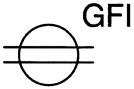
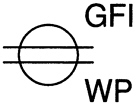
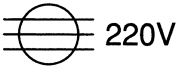
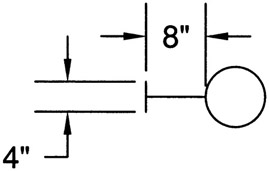
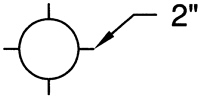
Draw each of the Symbol objects, shown on the following pages, actual size. Do not scale them.
Create an individual Block for each one using the BLOCK command.
Save this drawing as: Library
Plot the drawing, of your library symbols, for reference.
The format is your choice.
Use Page setup: 24 18 ARCH
Consider creating a library palette. Refer to page 10 11 .
| SYMBOLS | INSTRUCTIONS |
|---|---|
| 1 DUPLEX CONVENIENCE OUTLET | LAYER=ELECTRICAL |
| 2 GROUNDED DUPLEX OUTLET | GFI TEXT HEIGHT=3 POSITION TEXT APPROXIMATELY AS SHOWN |
| 3 GROUNDED WEATHER PROOF OUTLET | |
| 4 220 VOLT OUTLET | |
| 5 WALL MOUNTED FIXTURE W/INCANDESCENT LAMP | DIMENSIONS NOT SHOWN ARE THE SAME AS SYMBOL NUMBER 1. LAYER=ELECTRICAL |
| 6 CEILING MOUNTED FIXTURE W/FLUORESCENT LAMP | |
| 7 SUSPENDED FIXTURE W/INCANDESCENT LAMP |