Exercise Workbook for Advanced AutoCAD 2005

Lesson 13

INTRODUCTION TO 3D

We live in a three dimensional world, yet most of our drawings represent only two dimensions. In Lesson 6 you made an isometric drawing that appeared three dimensional. In reality, it was merely two dimensional lines drawn on angles to give the appearance of depth.

In the following lessons you will be presented with a basic introduction to AutoCAD s 3D techniques for constructing and manipulating objects. These lessons are designed to give you a good start into the environment of 3D and encourage you to continue your education in the world of CAD.

DIFFERENCES BETWEEN 2D AND 3D

Axes

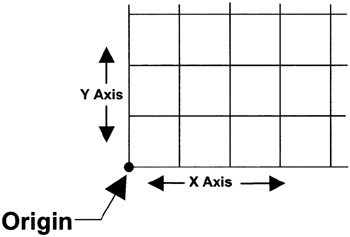
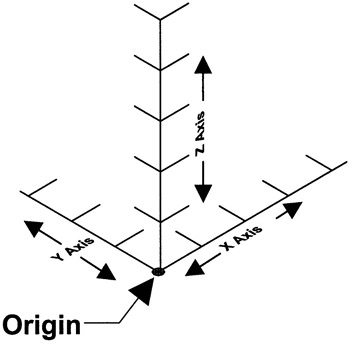
In 2D drawings you see only one plane. This plane has two axes, X for horizontal and Y for vertical. In 3D drawings an additional plane is added. This third plane is defined by an additional axis called Z. The direction of the positive Z axis basically comes out of the screen toward you and gives the object height. To draw a 3D object you must input all three, X, Y and Z axes coordinates.

A simple way to visualize these axes is to consider the X and Y axes as the ground and the Z axes as a Tree growing up (positive coordinates) from the ground or the roots growing down (negative coordinates) into the ground.


2D Coordinate System

3D Axes Coordinate System

BASIC TYPES OF 3D MODELS

There are 3 basic types of 3D models.

  1. Wireframe models

  2. Surface models

  3. Solid models

A brief description of...

UNLIMITED FREE
ACCESS
TO THE WORLD'S BEST IDEAS

SUBMIT
Already a GlobalSpec user? Log in.

This is embarrasing...

An error occurred while processing the form. Please try again in a few minutes.

Customize Your GlobalSpec Experience

Category: Computer-aided Design and Computer-aided Manufacturing Software (CAD/CAM)
Finish!
Privacy Policy

This is embarrasing...

An error occurred while processing the form. Please try again in a few minutes.