Exercise Workbook for Advanced AutoCAD 2005

3D Operations allow you to Mirror 3D, Rotate 3D, Align and Array a solid. The methods are almost identical to the 2D commands with the exception of defining the plane. You do not have to move the UCS.
Note: You may use the equivalent 2D commands but they will only work in the XY plane. It may be necessary to move the UCS .
THE FOLLOWING ARE EXPLANATIONS FOR THE 3D COMMANDS .
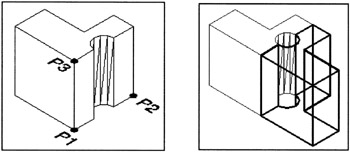
You must define the mirror plane.
Select the MIRROR 3D command using one of the following:
TYPE=MIRROR3D
PULLDOWN=MODIFY/3D OPERATIONS/MIRROR 3D
TOOLBAR=NONE
Select objects: select the solid to be mirrored
Select objects:
Specify first point of mirror plane (3 points) or [Object/Last/Zaxis/View/XY/YZ/ZX/3points] <3points>:
Specify first point on mirror plane: select the vertex of the plane (P1)
Specify second point on mirror plane: select the positive X direction (P2)
Specify third point on mirror plane: select the positive Y direction (P3)
Delete source objects? [Yes/No]
EXAMPLE:

You must pick 2 points to define the axis of rotation and the rotation angle. To determine the rotation angle you must look down the axis from the second point.
If you use my stabbing arrow analogy, you will put the positive end of the second point selected, in your chest and rotate the other two axes. Positive input is counterclockwise and Negative input is clockwise.
Select the ROTATE 3D command using one of the following:
TYPE=ROTATE3D
PULLDOWN=MODIFY/3D OPERATIONS/ROTATE 3D