Exercise Workbook for Advanced AutoCAD 2005

The REVOLVE command allows you to create a solid by revolving a closed shape around an axis or an object. The closed shape can be revolved from 1 to 360 degrees.
You select the axis to revolve around, the solid to be revolved and enter the angle of revolution.
Selecting the axis of revolution
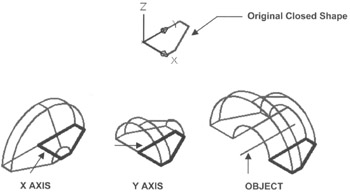
The axis of revolution can be the X or Y axis. It may also be an object such as a line.
The axis may be located on the closed shape or not.
Select the REVOLVE command using one of the following:
TYPE=REV or REVOLVE
PULLDOWN=DRAW/SOLIDS/REVOLVE
TOOLBAR=SOLIDS ![]()
Select objects: select the closed shape or region
Select objects: select more or
Specify start point for axis of revolution or define axis by [Object/X (axis)/Y (axis)]: select the X, Y or Object option
Select an object: select the axis of object to revolve about
Specify angle of revolution <360>: type the angle (positive or negative determines direction of rotation.
Below are examples of how you can make 3 different solids by selecting different Axis of Revolution .

The SLICE command allows you to make a knife cut through a solid. You specify the location of the slice by specifying the plane. After the solid has been sliced, you determine which portion of the slice you want removed. You may also keep both portions but they are still separate.