Exercise Workbook for Advanced AutoCAD 2005


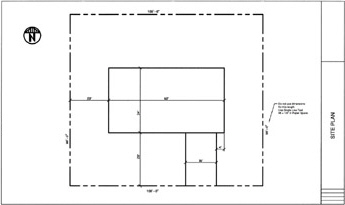
LOT 2 BLOCK A SCALE=1/8"=1'
PINE HILLS SUBDIVISION
SANTA ANA, CALIFORNIA
INSTRUCTIONS:
Open MY Feet-Inches SETUP
Select the 24 18 (EIGHTH FT) tab.
Draw the site plan above, in model space, full scale.
Dimension in Paper Space. Make sure True Associative dimensioning is On. (Dimassoc=2)
Design your own North symbol.
Fill in the information in the title block area.
Save as: EX-158 1
Plot using Page Setup: 24 18 ARCH

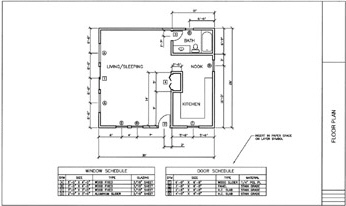
LOT 2 BLOCK A SCALE=1/4"=1'
PINE HILLS SUBDIVISION
SANTA ANA, CALIFORNIA
INSTRUCTIONS:
Open M Y FEET-INCHES SETUP
Select the 24 18(QTR-FT) tab.
Draw the floor plan above, in model space, full scale. (Dimension in Paper Space, Dimassoc=2)
Room title Ht.=6" Walls=6" wide Cabinets=24" deep.
Insert the SCHEDULES (ON LAYER SYMBOLS ) using the DesignCenter and your Library dwg.
Fill in the information in the title block area.
Save as: EX-158 2
Plot using Page Setup: 24 18 ARCH.

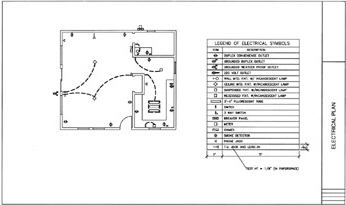
LOT 2 BLOCK A SCALE=1/4"=1'
PINE HILLS SUBDIVISION
SANTA ANA, CALIFORNIA
INSTRUCTIONS:
Open 158 2 and immediately save it as 1 58 3 for safety. Select the 24 18(QTR-FT) tab.
3. Freeze Layers: Dimension, Misc, and Symbols.
Change the WALLS layer Lineweight to default and Wiring layer to .024 .
This will emphasis the Wiring because it will be bolder.
Now insert the Electrical symbols (on layer Electrical)
Use Tables to create the Legend Of Electrical Symbols on Layer BORDER & TEXT-LIT in paperspace.
Fill in the information in the title block area.
Save as: EX-158 3 and Plot using Page...