Exercise Workbook for Advanced AutoCAD 2005

EXERCISES

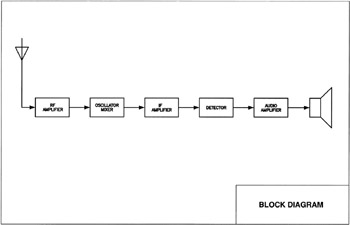
EXERCISE 156-1

INSTRUCTIONS:

  1. Open MY DECIMAL SET UP

  2. Use Layer: TEXT LIGHT for text. Use Layer OBJECT for objects and symbols.

  3. Size and proportions are your choice.

  4. Save as: EX-156 1

  5. Plot using Page Set up: 11 17 MONO.

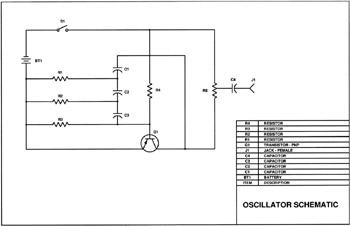
EXERCISE 156-2

The following is an example of a how you might construct a schematic.

  1. Open MY DECIMAL SETUP

  2. Select the 11 17(1 to 1) tab.

  3. Set: SNAP=.100 GRID=.100

  4. Draw the schematic in Model Space.

    The size is not critical but maintain good proportions and drawing balance.

    SUGGESTION:

    1. Use layer CONSTRUCTION to roughly layout the circuit lines

    2. Change to Layer Circuit before inserting symbols.

    3. Insert symbols and locate as shown. (Drag and drop from the DesignCenter, Library drawing

    4. Draw the actual schematic lines on top of the Construction Lines skipping over the symbols. Use layer circuit2

    5. Now FREEZE layer Construction

    (Now you don t have to trim the lines under the symbols.)

  5. Draw the solder points using Donuts .00 I.D. and.1000.D.

    Use layer Circuit

  6. Add the designators, use layer Designator.

    Text Ht.=.125

  7. Add the Parts List (In Paperspace) Rows=.25 Text Ht.=.125 (Try Tables )

  8. Edit the title block

  9. Save as EX-156 2

  10. Plot using Page Set up: 11 17 MONO.

EXERCISE 156-3

This drawing is only a template. It will be used as a template for the following 4 drawings. If you follow the instructions and draw this template correctly, the next 4 drawings will be very easy.

  1. Open MY DECIMAL SETUP

  2. Select the 11 17 (1 to 1)

UNLIMITED FREE
ACCESS
TO THE WORLD'S BEST IDEAS

SUBMIT
Already a GlobalSpec user? Log in.

This is embarrasing...

An error occurred while processing the form. Please try again in a few minutes.

Customize Your GlobalSpec Experience

Category: Drawbenches and Drawing Machines
Finish!
Privacy Policy

This is embarrasing...

An error occurred while processing the form. Please try again in a few minutes.