CONSTRUCTING SOLID PRIMITIVES
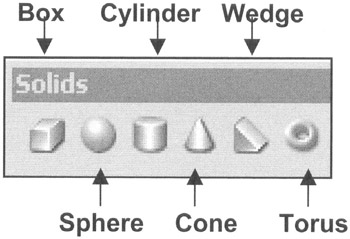
AutoCAD has 6 Solid Primitives.
The 6 are, Box, Sphere, Cylinder, Cone, Wedge and Torus.
How to select a solid primitive.
TYPE=TYPE THE NAME
PULLDOWN=DRAW/SOLIDS
TOOLBAR=SOLIDS
In this lesson you will learn the required steps to construct each of AutoCAD s Solid Primitive objects. Each one requires different input information and some have multiple methods of construction.
3D input direction
When drawing in 3D and prompted for Length, Width or Height, each input corresponds to an axis direction as follows:
Length=X Axis
Width=Y Axis
Height=Z Axis
For example, if you are prompted for the Length the dimension that you enter will be drawn in the X axis. So keep your eye on the UCS icon in order to draw the objects in the correct orientation.
Consider starting the primitives on the Origin. It is useful to know where the primitive is located so it can be moved or rotated easily.
In Lesson 15 you will learn more about moving the UCS around to fit your construction needs. But relax and lets s take it one step at a time.
BOX
There are 4 methods to draw a Solid Box. Which one you will use will depend on what information you know. For example, if you know where the corners of the base are located and the height, then you could use method 1 or 2.
Method 1 (Enter the location for a; 1. corner, 2. diagonal corner and the 3. height)
-
Select the SE Isometric


 TABLE OF CONTENTS