Exercise Workbook for Beginning AutoCAD 2007
After completing this lesson, you will be able to:
Draw an Inscribed and Circumscribed Polygon.
Create an Ellipse using two different methods.
Draw an object called Donut.
Define a Point location.
Select various Point Styles.
Use 3 new Object Snap modes.
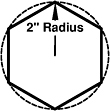
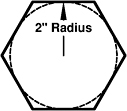
A polygon is an object with multiple sides of equal length. You may specify from 3 to 1024 sides. A polygon appears to be multiple lines, but, in fact, it is one object. You can specify the edge length or the center and a radius. The radius can be drawn inside (Inscribed) an imaginary circle or outside (Circumscribed) an imaginary circle.
CENTER / RADIUS METHOD
Select the Polygon command using one of the following:
TYPING = POL
PULLDOWN = DRAW / POLYGON
TOOLBAR = DRAW ![]()
The following prompts will appear on the command line:
_polygon Enter number of sides <4>: type number of sides
Specify center of polygon or [Edge]: specify the center location
Enter an option [Inscribed in circle/Circumscribed about circle]: type I or C
Specify radius of circle: type radius or locate with cursor.

INSCRIBED

CIRCUMSCRIBED
EDGE METHOD
Select the Polygon command using one of the following:
TYPING = POL
PULLDOWN = DRAW / POLYGON
TOOLBAR = DRAW ![]()
The following prompts will appear on the command line:
_polygon Enter number of sides <4>: type number of sides
Specify center of polygon or [Edge]: type E
Specify first endpoint of edge: place first endpoint of edge (P1)
Specify second endpoint of edge: