Exercise Workbook for Beginning AutoCAD 2007
Color is not merely to make a pretty display on the monitor screen.
Here are some things to consider when selecting the colors for your layers.
Now that color printers are so commonplace, consider how the colors will appear on the paper. (Pastels do not appear well on white paper. )
Consider how the colors will appear on the screen. (Yellow appears well on a black background but not on white. Changing the screen color is in the Advanced Workbook. )
If you choose to use color dependent plot styles instead of lineweights, color will determine the width of the lines.

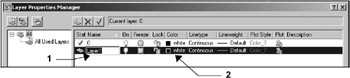
Select (highlight) the layer that you want to change.
Select the color swatch or word. (white)
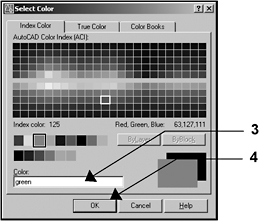
Select the color (The name or the number will appear in the color box. )
Select the OK button.

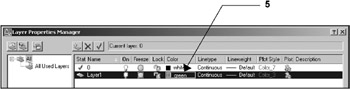
The color selected will appear on the layer line.