Exercise Workbook for Beginning AutoCAD 2007
Using layers is an important part of managing and controlling your drawing. It is better to have too many layers than too few. Draw like objects on the same layer.
For example, place all doors on the layer door or centerlines on the layer centerline .
When you create a new layer you will assign a name, color, linetype, lineweight and whether or not it should plot.
Select the Layer command using one of the following:
TYPE = LA
PULLDOWN = FORMAT / LAYER
TOOLBAR = OBJECT PROPERTIES ![]()
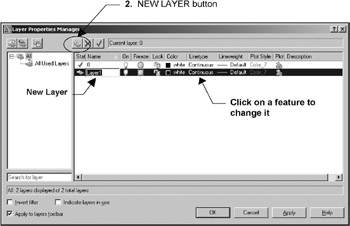
The Layer Properties Manager dialog box shown below will appear.

Select the New Layer button and a new layer will appear. Type the new layer name and press
Click on any of the features and a dialog box will appear.
The following pages will describe Color, Linetype, and Layer Controls . Refer to page 9-7 for a reminder on Lineweights .