Exercise Workbook for Beginning AutoCAD 2007
SETTING THE PICK BOX SIZE

? Pick box

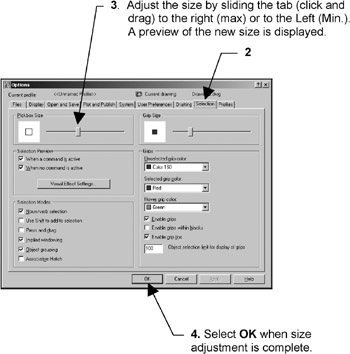
When AutoCAD prompts you to select objects, such as when you are erasing objects, the cursor (crosshairs) turns into a square. This square is called a Pick box. The size of the Pick box can be changed. Some AutoCAD users prefer large boxes, some like small boxes. The size of the box is your personal preference, however, the smaller the Pick box the more accurate you must be when placing the pick box on an object to select it. If the Pick box is too large it could overlap onto other objects that you did not want to select.

HOW TO CHANGE THE PICK BOX SIZE.

  1. Select TOOLS / OPTIONS

  2. Select the SELECTION tab.

The following dialog box will appear.

UNLIMITED FREE
ACCESS
TO THE WORLD'S BEST IDEAS

SUBMIT
Already a GlobalSpec user? Log in.

This is embarrasing...

An error occurred while processing the form. Please try again in a few minutes.

Customize Your GlobalSpec Experience

Category: Pick and Place Systems
Finish!
Privacy Policy

This is embarrasing...

An error occurred while processing the form. Please try again in a few minutes.