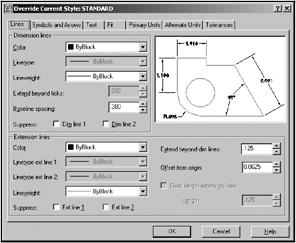
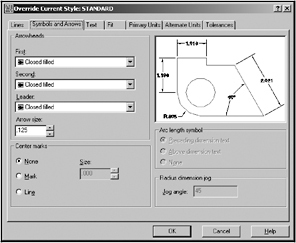
When you select Dimension / Style / Modify the following dialog box will appear.
The following are descriptions for each setting within each section tab.
Lines tab
Dimension Lines
Color: Color of the dimension line.
Linetype: Sets the linetype for the dimension lines.
Lineweight: Sets the width of the dimension lines.
Extend beyond ticks: Distance to extend dimension line beyond the extension line.
Baseline spacing: Spacing between baseline dimensions.
Suppress: Suppress means disappear. You may suppress individually or both.
Extension Lines
Color: Color of the extension lines
Linetype ext line 1: Sets the linetype for the 1 st extension lines.
Linetype ext line 2: Sets the linetype for the 2 nd extension lines.
Lineweight: Sets the width of the extension lines.
Supress: You may suppress the 1 st or 2 nd extension lines individually or both.
Extend beyond dim. line: Distance to extend extension line beyond the dimension line. Example above.
Offset from origin: The distance between the object and the extension line. Example above.
Fixed length extension lines: Sets the total length of the extension lines starting from the dimension line toward the dimension origin.
Symbols and Arrows tab
Arrowheads
First : Sets the style for the symbol inserted for the first extension point
Second: Sets the style...
Copyright Cheryl R. Shrock 2006 under license agreement with Books24x7

 TABLE OF CONTENTS