Exercise Workbook for Beginning AutoCAD 2007
Lesson 7

LEARNING OBJECTIVES

After completing this lesson, you will be able to:

  1. Copy objects.

  2. Make a mirrored image of one or more objects.

  3. Add rounded corners to rectangular objects and lines.

  4. Add angles to corners.

COPY

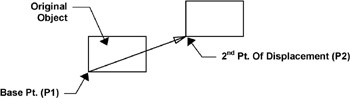
The COPY command creates a duplicate set of the objects selected. The COPY command is similar to the MOVE command. You must 1. select the objects to be copied, 2. select a base point and a 3. new location. The difference is, the Move command merely moves the objects to a new location. The Copy command makes a copy and you select the location for the new copy.

Select the Copy command using one of the following commands:

  • TYPE = CO

    PULLDOWN = MODIFY / COPY

    TOOLBAR = MODIFY

Command: _copy
Select objects: select the objects you want to copy
Select objects: stop selecting objects by selecting
Specify base point or displacement: select a base point (P1) (usually on the object)
Specify second point of displacement or : select the new location (P2) for the first copy
Specify second point or [Exit / Undo] : select the new location (P2) for the next copy or press to exit.

MIRROR

The MIRROR command allows you to make a mirrored image of any objects you select. You can use this command for creating right / left hand parts. You can draw a symmetrical object more efficiently by only drawing half of it.

Select the MIRROR command using one of the following:

  • TYPE =...

UNLIMITED FREE
ACCESS
TO THE WORLD'S BEST IDEAS

SUBMIT
Already a GlobalSpec user? Log in.

This is embarrasing...

An error occurred while processing the form. Please try again in a few minutes.

Customize Your GlobalSpec Experience

Category: LiDAR Sensors
Finish!
Privacy Policy

This is embarrasing...

An error occurred while processing the form. Please try again in a few minutes.