Exercise Workbook for Beginning AutoCAD 2007
Lesson 21

LEARNING OBJECTIVES

After completing this lesson, you will be able to:

  1. Change an object s properties to match the properties of another object.

  2. Create a Revision Cloud

  3. Select the Revision Cloud Style

  4. Cover part of the drawing with a blank patch.

MATCH PROPERTIES

Match Properties is used to paint the properties of one object to another. This is a simple and useful command. You first select the object that has the desired properties (the source object) and then select the object you want to paint the properties to (destination object).

Only one source object can be selected but its properties can be painted to any number of destination objects .

  1. Select the Match Properties command using one of the following:

    • TYPE = MATCHPROP or MA

    • PULLDOWN = MODIFY / MATCH PROPERTIES

    • TOOLBAR = STANDARD

    Command: matchprop

  2. Select source object: select the object with the desired properties to match

  3. Select destination object(s) or [Settings]: select the object(s) you want to receive the matching properties.

  4. Select destination object(s) or [Settings]: select more objects or to stop.

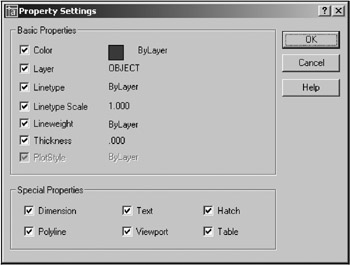
Note: If you do not want to match all of the properties, right click and select Settings from the short cut menu, before selecting the destination object. Uncheck all the properties you do not want to match and select the OK button. Then select the destination object(s).

CREATING A REVISION CLOUD

When you make a revision to a drawing it is sometimes helpful to highlight the revision for someone viewing the drawing. A common method to...

UNLIMITED FREE
ACCESS
TO THE WORLD'S BEST IDEAS

SUBMIT
Already a GlobalSpec user? Log in.

This is embarrasing...

An error occurred while processing the form. Please try again in a few minutes.

Customize Your GlobalSpec Experience

Category: Color Meters and Appearance Instruments
Finish!
Privacy Policy

This is embarrasing...

An error occurred while processing the form. Please try again in a few minutes.