Exercise Workbook for Beginning AutoCAD 2007
After completing this lesson, you will be able to:
Duplicate an object at a specified distance away.
Make changes to an object s properties.
Create tables using Single Line and Multiline text.
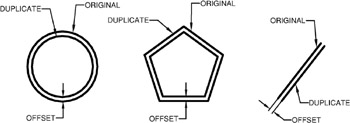
The OFFSET command duplicates an object parallel to the original object at a specified distance. You can offset Lines, Arcs, Circles, Ellipses, 2D Polylines and Splines.
EXAMPLES:

How to use the OFFSET command:
Select the OFFSET command using one of the following:
TYPING = OFFSET
PULLDOWN = MODIFY / OFFSET
TOOLBAR = MODIFY ![]()
Specify offset distance or [Through/Erase/Layer]
Select object to offset or
Specify point on side to offset or [Exit/Multiple/Undo]
Select object to offset or [Exit/Undo]
OPTIONS:
Through: Creates an object passing through a specified point.
Erase: Erases the source object after it is offset.
Layer: Determines whether offset objects are created on the current layer or on the layer of the source object. Select Layer and then select current or source.
Multiple: Turns on the multiple offset mode, which allows you to continue creating duplicates of the original without re-selecting the original.
Exit: Exits the Offset command.
Undo: