Exercise Workbook for Beginning AutoCAD 2007
After completing this lesson, you will be able to:
Understand the Polar Degree Clock.
Draw Lines to a specific length and angle
Draw Objects using Polar Coordinate Input.
Use Dynamic Input.
Construct an Isometric view.
In Lesson 9 you learned to control the length and direction of horizontal and vertical lines using Relative Input and Direct Distance Entry. Now you will learn how to control the length and ANGLE of a line using POLAR COORDINATE INPUT.
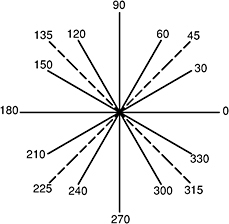
UNDERSTANDING THE POLAR DEGREE CLOCK
Previously when drawing Horizontal and Vertical lines you controlled the direction using a Positive or Negative input. Polar Input is differen t. The Angle of the line will determine the direction. For example: If I want to draw a line at a 45 degree angle towards the upper right corner, I would use the angle 45. But if I want to draw a line at a 45 degree angle towards the lower left corner, I would use the angle 225. You may also use Polar Input for Horizontal and Vertical lines using the angles 0, 90, 180 and 270. No negative input is required.

DRAWING WITH POLAR COORDINATE INPUT
A Polar coordinate may come from the last point entered or from the Origin, depending upon whether you use the @ symbol or not. The first number represents the Distance and the second number represents the Angle. The two numbers are separated by the less than (<) symbol.
The...