Exercise Workbook for Beginning AutoCAD 2007
After completing this lesson, you will be able to:
Understand what is a Polyline.
Draw a Polyline and Polyarc.
Assign widths to polylines.
Set the Fill mode to On or Off.
A POLYLINE is very similar to a LINE. It is created in the same way a line is drawn. It requires first and second endpoints. But a POLYLINE has additional features, as follows:
A POLYLINE is ONE object, even though it may have many segments.
You may specify a specific width to each segment.
You may specify a different width to the start and end of a polyline segment.
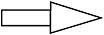
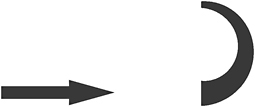
THE FOLLOWING ARE EXAMPLES OF POLYLINES WITH WIDTHS ASSIGNED.
Fill Mode = Off

Fill Mode = On
To turn FILL MODE on or off.
Command: type FILL
Enter mode [On / Off]
Command: type REGEN < enter> or select: View / Regen
NOTE: If you explode a POLYLINE it loses its width and turns into a regular line.
THE FOLLOWING IS AN EXAMPLE OF DRAWING A POLYLINE WITH WIDTH
Select the POLYLINE command using one of the following:
TYPE = PL
PULLDOWN = DRAW / POLYLINE
TOOLBAR = DRAW ![]()
Command: _pline
Specify start point: place the first endpoint of the line
Current line-width is 0. 000
Specify next point or [Arc/Halfwidth/Length/Undo/Width]: type w
Specify starting width <0. 000>: type the desired width
Specify ending width <0. 000>: type the desired width
Specify next point or [Arc/Close/Halfwidth/Length/Undo/Width]: